
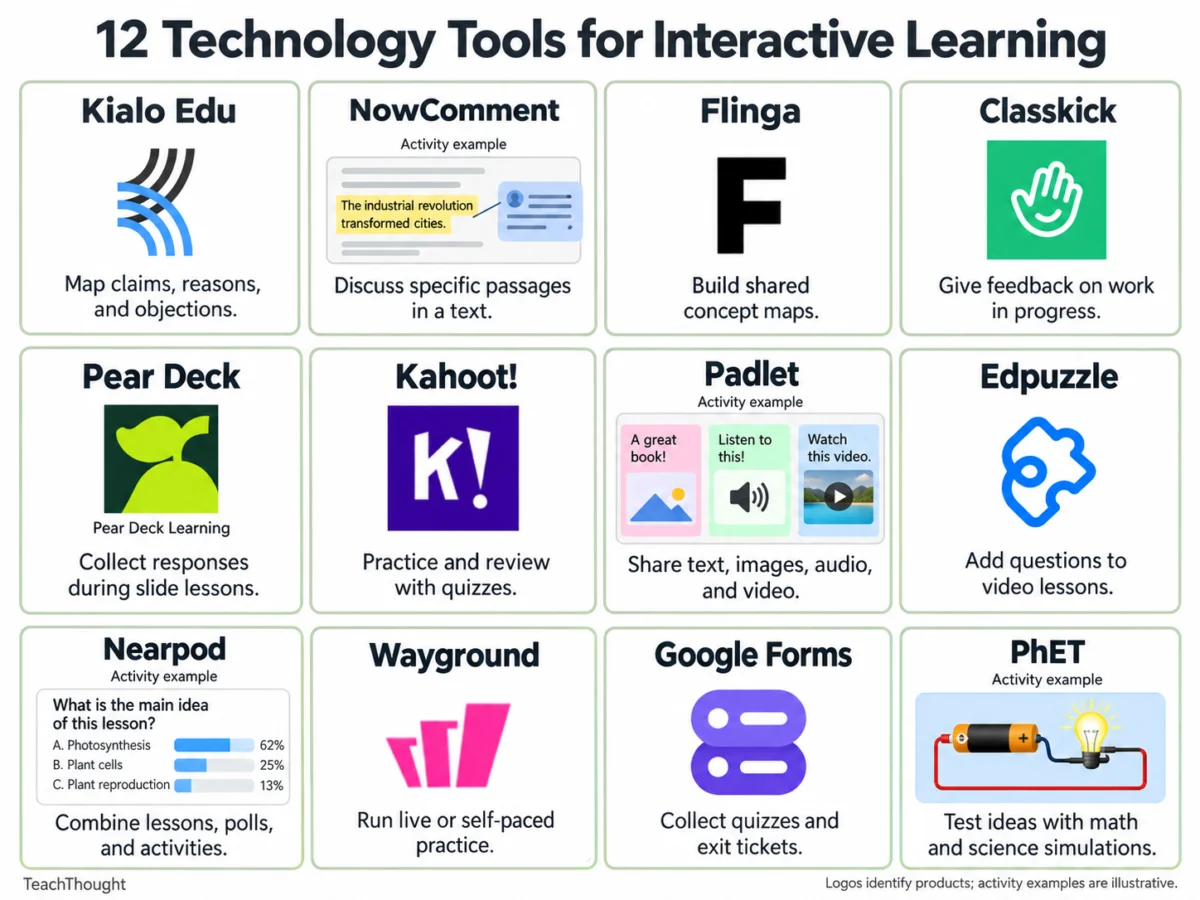
In the contemporary educational landscape, the integration of digital technology has fundamentally shifted the paradigm from passive instruction to active student engagement. Interactive learning platforms have emerged as vital infrastructure across in-person, remote, and blended classrooms. These tools provide educators with sophisticated mechanisms to facilitate peer-to-peer discourse, test theoretical predictions, deconstruct complex reasoning, and deliver immediate formative feedback. Recent educational research emphasizes that continuous real-time assessment significantly improves student retention and conceptual understanding. Consequently, school districts worldwide are increasingly adopting digital environments that move beyond traditional multiple-choice interfaces to foster critical thinking, collaborative annotation, and exploratory modeling.
The evolution of classroom technology spans more than two decades, beginning with rudimentary digital clickers in the early 2000s and expanding into cloud-based ecosystems, augmented reality, and collaborative workspaces. The rapid transition to remote learning during the early 2020s accelerated the adoption of these platforms, forcing educators to rapidly acquire digital competencies. Today, interactive tools are no longer viewed merely as emergency substitutes for physical classrooms, but rather as permanent fixtures designed to bridge equity gaps, accommodate diverse learning styles, and offer granular analytics to instructional staff.
Choosing the appropriate technological instrument requires careful alignment with specific pedagogical goals. Educators must evaluate whether a task demands divergent brainstorming, convergent problem-solving, or individual self-paced practice. Below is an exhaustive analysis of twelve prominent interactive tools categorized by their primary instructional utilities, including structural overviews, practical classroom applications, implementation caveats, and platform parameters.
Collaborative Argument Mapping and Structured Disagreement
Kialo Edu
Kialo Edu serves as a specialized platform designed for argument mapping and structured disagreement. The software organizes digital discourse around a central controversial claim, allowing students to systematically add supporting and opposing arguments while directly responding to individual points within a visual node structure. This architecture explicitly demonstrates how distinct reasons connect logically to overarching claims.
In a standard classroom setting, educators might present the prompt: "Schools should eliminate homework." Students are tasked with contributing a reasoned argument, backing it with verifiable evidence, and addressing a pre-existing objection on the map. Afterward, learners are prompted to refine claims that prove overly broad or lack sufficient substantiation.
Pedagogical experts recommend modeling the foundational differences between assertions, reasons, and evidence before deploying the software. Because large maps can quickly become overwhelmingly dense, instructors should initiate exercises with narrow, highly focused questions. Kialo Edu provides a free educational platform tailored specifically for institutional use.
NowComment
For close reading and collaborative textual analysis, NowComment provides an environment where students engage in threaded discussions directly alongside specific passages of online documents. Because commentary remains permanently anchored to the source text, the platform facilitates deep textual analysis, peer review, and comparative literary interpretation.
A typical application involves sharing a public-domain historical speech. Students are directed to isolate the primary claim, evaluate the credibility of the provided evidence, and counter-argue a classmate who interprets the passage through a different lens. Disputed passages can subsequently form the core of a whole-class Socratic seminar.
To prevent student feeds from devolving into fragmented remarks, instructors must establish a clear annotation routine. While NowComment offers free foundational accounts, administrators must carefully verify document privacy permissions and student account compliance protocols prior to launching assignments.
Visual Concept Organization and Workspace Collaboration
Flinga
Flinga specializes in collaborative concept mapping by offering shared digital workspaces where classes can harvest ideas and construct organizational webs. Students access the environment via standard web browsers using session links or unique codes. Flinga Whiteboard, in particular, is frequently utilized to chart complex relationships and map dependencies across broad subject matters.
Following a field study of a local watershed, for instance, small groups can utilize Flinga to chart the intricate causal relationships connecting land use, agricultural runoff, water quality, and local wildlife populations. Teams are subsequently required to articulate two primary causal linkages and identify one relationship that demands further empirical validation.
Successful implementation requires establishing shared definitions for spatial positioning and connector lines before students begin editing. Instructors are cautioned that a visually pristine map can still harbor fundamental flaws in logical reasoning. Educators should test access permissions and monitor account quotas prior to orchestrating multi-phase collaborative projects.
Padlet
Padlet functions as an expansive digital corkboard where students post multimedia artifacts, including text blocks, imagery, audio files, and embedded video links. When comment functions are enabled, the platform transforms into an active forum for peer review and qualitative critique.
During a literature unit, students might isolate a specific paragraph that underpins their interpretation of a protagonist’s moral dilemma. Peers are then instructed to review the post, locate a classmate with an alternative interpretation, and construct a written response agreeing or disagreeing using direct textual citations.
Clear objectives are paramount to prevent superficial posting. Educators must audit privacy settings prior to student upload phases, particularly when media recordings or identifiable student work are involved. Standard free accounts generally restrict users to three active boards concurrently.
Real-Time Formative Assessment and Monitoring
Classkick
Classkick bridges the gap between independent practice and live teacher oversight by allowing educators to design digital assignments, monitor student progress stroke-by-stroke in real time, and inject targeted feedback directly onto student workspaces while tasks are underway. The platform accepts digital drawings, typed text, and external media, giving educators a holistic view of the problem-solving journey rather than just a final product.
In mathematics instruction, students might be assigned a complex proportional-reasoning problem requiring two distinct visual representations. The instructor monitors the live dashboard and drops targeted inquiry questions onto the exact slide coordinate where a student’s mathematical reasoning derails.
Institutional deployment requires mindful management of platform limits. The free Basic tier enforces monthly restrictions on assignment slots and student work pages. Because every individual slide interaction counts toward this aggregate total, educators must calculate class sizes and assignment frequencies carefully.
Pear Deck
Pear Deck integrates seamlessly into slide-based presentations, embedding interactive questioning modules directly into standard instructional decks. Students interact via personal devices, transmitting instant data feeds back to the teacher’s dashboard to gauge whole-class comprehension mid-lesson.
During a lecture on rhetorical devices, an instructor might pause the presentation to deploy an interactive prompt asking students to select the piece of evidence that most effectively anchors a specific claim, followed by a brief written justification. The resulting distribution data dictates whether the teacher needs to reteach the distinction between relevant data and topically adjacent information.
Because Pear Deck relies heavily on existing slide decks, adoption is friction-free for traditional lecturers. However, educators must review tiered feature lists, as interactive response types and advanced dashboard analytics differ significantly between complimentary and enterprise subscriptions.
Kahoot!
Kahoot! utilizes gamified quiz mechanics to drive classroom review sessions. By introducing point systems, timed responses, and competitive leaderboards, the platform leverages game-based psychology to maximize student participation during drill-and-practice segments.
A science review can be strategically engineered to include distractor answers that mirror prevalent student misconceptions. Following a question round, the instructor pauses the game to analyze why a particular incorrect answer appeared plausible, converting a simple score check into a robust conceptual debate.
Educators must remain cognizant of participant thresholds. The complimentary Go tier limits live sessions to small groups, requiring institutional licenses for full-scale auditorium deployment. Furthermore, the competitive nature of the software must be balanced to ensure anxious learners feel psychologically safe.
Video Integration and Self-Paced Modules
Edpuzzle
Edpuzzle transforms passive video viewing into an active cognitive task by enabling teachers to embed multiple-choice questions, open-ended prompts, and audio notes at exact timestamps within digital video files. The platform tracks completion metrics and aggregates student responses for analytical review.
When teaching earth sciences, an instructor might pause a geological demonstration video immediately before an experimental outcome occurs, prompting students to formulate a predictive hypothesis. Post-experiment footage is then unlocked, requiring students to reconcile their initial predictions with observed physical phenomena.
Instructional design discipline is critical; overloading a video with excessive interruptions disrupts narrative comprehension. Edpuzzle’s complimentary Basic account caps digital storage at twenty active video activities, necessitating regular content archiving.
Nearpod
Nearpod offers a comprehensive instructional suite that marries static content delivery with interactive simulations, collaborative boards, embedded quizzes, and formative polls. Lessons can be delivered synchronously under direct teacher control or distributed as asynchronous, self-paced modules.
A social studies unit might open with a live polling module regarding a controversial historical decree. After examining foundational primary-source texts, students complete an open-ended reflection evaluating whether the newly acquired evidence alters their initial perspective, guiding the subsequent class debate.
Nearpod is exceptionally valuable for educators seeking a unified ecosystem. Nevertheless, the entry-level Silver tier imposes strict limits on concurrent student joins per session, requiring careful scheduling for large multi-section courses.
Wayground (Formerly Quizizz)
Wayground provides versatile assessment capabilities that function seamlessly in both live-moderated environments and independent homework modes. While retaining gamified mechanics like power-ups and leaderboards, the platform allows flexible self-paced completion options.
For linguistic vocabulary acquisition, students can be assigned modules requiring them to deduce contextual word meanings from embedded reading excerpts. Post-assessment reporting highlights frequently missed terms, giving the instructor actionable data for targeted remediation.
Instructors should review session parameters to ensure that competitive elements do not undermine collaborative learning goals. The free Starter tier provides basic question architecture and reporting suites, though resource storage capacities are capped, and feature availability varies by geographic region.
Verification and Experimental Simulation
Google Forms
Google Forms remains a ubiquitous, highly reliable utility for gathering structured feedback, administering exit tickets, and executing short-form quizzes. The application automatically scores objective question formats while leaving qualitative, open-ended reflections for manual teacher review.
A standard exit ticket workflow might direct students to solve a single calculus problem, articulate the rationale behind a specific intermediary step, and identify one remaining area of confusion. This diagnostic data informs the formation of targeted small groups for the subsequent instructional cycle.
Before deployment, educators must verify sharing permissions and sign-in requirements to ensure seamless submission mechanics. For alternative formative structures, educators frequently cross-reference frameworks outlined by pedagogical authorities such as TeachThought’s foundational assessment strategies.
PhET Interactive Simulations
Developed by the University of Colorado Boulder, PhET Interactive Simulations provides rigorous, scientifically accurate mathematical and physical models. These digital sandboxes allow students to manipulate isolated variables and immediately observe systemic reactions in real time.
Utilizing the Circuit Construction Kit, students build virtual electrical loops, predict the cascading effects of altering resistance values, and test their hypotheses empirically. Learners record variable changes and utilize visual observations to construct scientific explanations for the resulting currents.
Successful deployment demands clear investigative prompts and structured data-collection frameworks. Educators must pre-screen selected simulations across all targeted classroom hardware to ensure operational compatibility and verify the availability of accessibility tools for diverse learners.
Strategic Selection and Implementation Frameworks
Integrating interactive learning tools successfully requires a deliberate, methodical approach. Instructional technology experts advise against adopting multiple platforms simultaneously, as digital fatigue can impair both student performance and teacher bandwidth.
To maximize instructional ROI, educators should follow a structured decision-making workflow:
- Identify the Pedagogical Objective: Determine the exact cognitive task required—whether it is brainstorming, close reading, hypothesis testing, or summative recall.
- Analyze Diagnostic Needs: Establish what specific evidence of student understanding is required to alter instructional pacing.
- Audit Technical Constraints: Evaluate institutional device compatibility, student account privacy compliance, and free-tier platform limitations (such as storage limits, user caps, and monthly submission quotas).
- Pilot Incrementally: Integrate a single tool into an existing, well-rehearsed lesson plan before scaling its deployment across an entire curriculum.
By anchoring technology selection to sound pedagogical principles rather than novelty, educators can harness digital tools to foster deeper critical thinking, enhance formative feedback loops, and cultivate highly engaged learning environments.

