
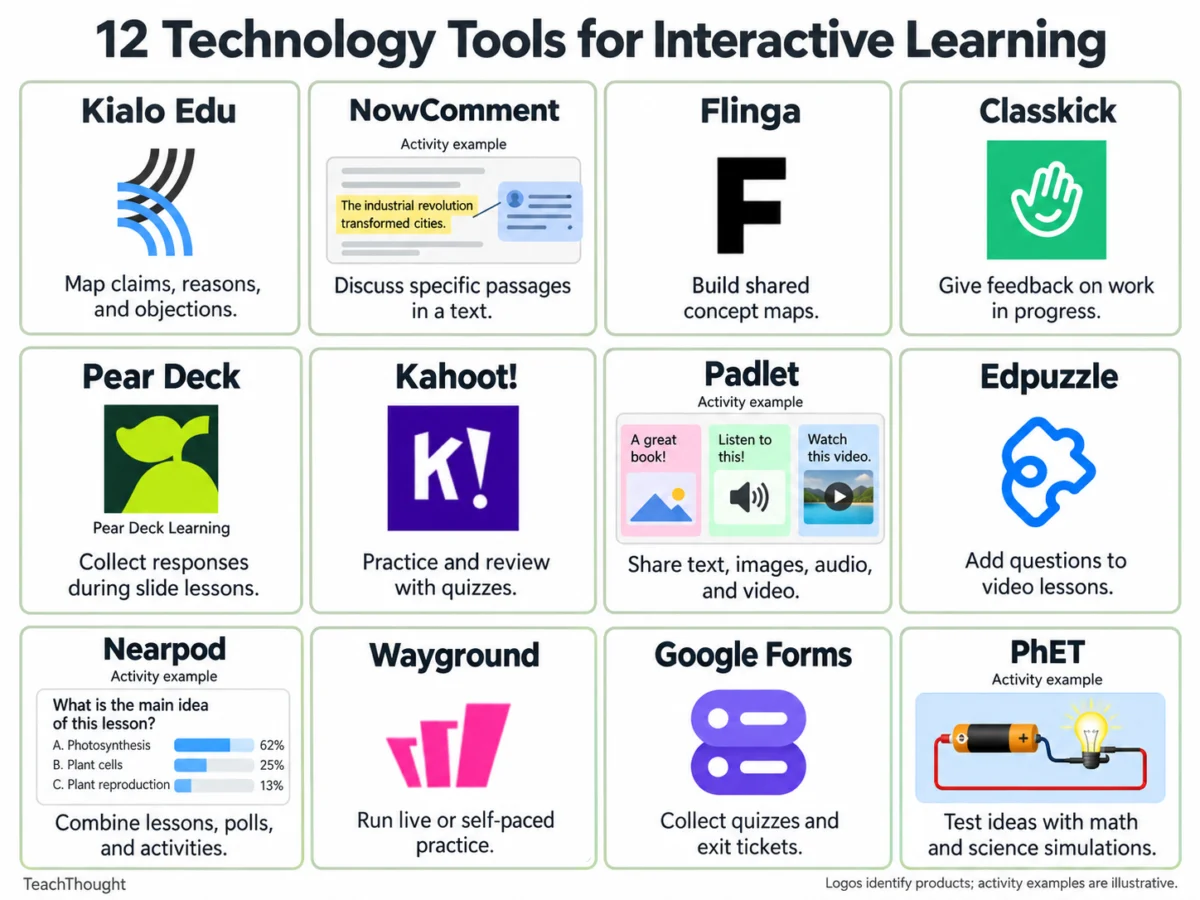
Technology tools for interactive learning have fundamentally transformed how educators engage students across in-person, blended, and remote learning environments. By providing dynamic ways for students to discuss ideas, explain their reasoning, test predictions, and receive real-time feedback, these digital platforms have become indispensable assets in contemporary education. Teachers rely on these solutions to aggregate whole-class responses, review individual student work instantaneously, and dynamically adjust instruction based on identified learning gaps.
The integration of educational technology has accelerated significantly over the past decade, shifting from static digital textbooks to highly interactive, collaborative ecosystems. Initially popularized as novelty supplements, interactive learning tools became critical infrastructure during the global pivot to remote instruction in the early 2020s. Today, school districts worldwide continue to invest heavily in EdTech platforms to support differentiated instruction, data-driven teaching, and hybrid learning models. According to recent educational market analyses, global investments in digital learning platforms continue to expand, driven by a growing demand for student-centered pedagogy and measurable formative assessment data.
Evaluating the Pedagogical Impact of EdTech Integration
Educational researchers emphasize that the efficacy of any digital tool depends heavily on intentional instructional design rather than the software itself. When implemented correctly, shared digital documents allow learners to dissect difficult historical texts or literary passages through collaborative annotation. Argument mapping software empowers students to systematically examine competing claims, separating unsubstantiated opinions from empirical evidence. Meanwhile, interactive simulations bridge the gap between abstract theoretical concepts and observable physical phenomena, enabling students to manipulate variables in real-time.
To maximize these benefits, educators must carefully select tools that align directly with specific learning objectives. Whether the goal is collaborative reading, concept mapping, formative assessment, or interactive gamification, the twelve tools outlined below offer diverse pathways for student participation and data collection.
Structured Argumentation and Collaborative Mapping
1. Kialo Edu
Kialo Edu provides a specialized platform designed for argument mapping and structured disagreement. The tool organizes an entire discussion around a central thesis, prompting students to contribute supporting and opposing arguments while directly responding to specific points within the visual map. This hierarchical structure helps students visualize the logical connection between a claim and its underlying evidence.
- Classroom Application: Educators can prompt students to evaluate controversial statements, such as the proposition that schools should eliminate homework. Students must contribute a reasoned argument, back it up with empirical data, and actively address counterarguments or objections.
- Best Practices: Instructors should model the fundamental distinction between an assertion, a supporting reason, and hard evidence before launching the activity. Because sprawling argument maps can quickly become overwhelming, teachers should begin with narrowly focused questions. Kialo Edu offers a robust, free platform tailored specifically for academic discussions.
2. NowComment
NowComment facilitates close reading and shared document annotation, enabling students to hold threaded, contextualized discussions alongside specific passages of text. Because comments remain permanently tethered to the source material, the platform is particularly effective for close-reading exercises, peer-review sessions, and comparative literary analysis.
- Classroom Application: Teachers can upload public-domain speeches or historical documents, instructing students to identify central claims, critique the provided evidence, and debate alternative interpretations offered by peers.
- Best Practices: Establishing a clear annotation routine prevents the shared document from becoming cluttered with disorganized remarks. NowComment provides free accounts, though educators must verify document permission settings and student privacy requirements prior to assignment deployment.
3. Flinga
Flinga specializes in collaborative concept mapping by offering shared digital workspaces where students can collect, sort, and connect ideas. Operating entirely through standard web browsers via session codes or direct links, Flinga Whiteboard helps students visually map complex relationships and conceptual hierarchies.
- Classroom Application: Following a science unit on local ecosystems, small groups can map the intricate relationships linking land use, agricultural runoff, water quality, and local wildlife populations. Groups are then tasked with defending specific connections and identifying areas requiring further empirical investigation.
- Best Practices: Teams must establish a shared vocabulary for their concept links before beginning the mapping process. Instructors should note that a visually organized map can still harbor flawed underlying logic, necessitating close teacher oversight.
Real-Time Assessment and Progress Monitoring
4. Classkick
Classkick bridges the gap between independent practice and direct teacher intervention by allowing educators to design digital assignments, monitor student work as it unfolds in real time, and deliver immediate formative feedback. Students interact with the platform using digital drawing tools, text inputs, and multimedia files, providing teachers with a comprehensive view of their cognitive process rather than just a final numerical answer.
- Classroom Application: Students can be assigned multi-step proportional reasoning problems that require two distinct visual representations of their solution. Teachers can monitor progress live and leave targeted questions precisely where a student’s mathematical reasoning breaks down.
- Best Practices: The free tier of Classkick operates on monthly usage caps governing assignment slots and student page interactions. Educators must calculate their class sizes and assignment frequencies to ensure the free allowance meets their instructional needs.
5. Pear Deck
Pear Deck transforms traditional slide-based presentations into interactive instructional experiences. By embedding formative assessment prompts directly into slide decks, teachers enable students to respond on their personal devices, yielding immediate diagnostic insights into classroom comprehension.
- Classroom Application: During a lesson on rhetorical analysis, instructors can pause the presentation to ask students to identify the single piece of evidence that best supports an author’s claim, requiring a written justification for their choice.
- Best Practices: Pear Deck integrates seamlessly with existing presentation workflows. However, educators should review feature comparisons between free and paid tiers to ensure access to preferred teacher dashboard configurations.
Gamified Review and Interactive Media Integration
6. Kahoot!
Kahoot! remains a dominant force in quiz-based review and gamified learning. By incorporating point systems, timers, and competitive leaderboards, the platform drives high levels of student engagement during review sessions.
- Classroom Application: During unit reviews in science or history, educators can intentionally design multiple-choice distractors that mirror common student misconceptions. Pausing the game to dissect why an incorrect option appears plausible yields richer diagnostic data than reviewing the final scoreboard alone.
- Best Practices: Teachers should verify participant capacity limits for their specific account tiers, as free plans often restrict the total number of simultaneous players per game session.
7. Padlet
Padlet functions as an expansive virtual bulletin board where students can publish text, images, videos, audio recordings, and external links. When comment functions are enabled, the platform fosters dynamic peer-to-peer critique and collaborative curation.
- Classroom Application: In humanities classrooms, students can post media artifacts or textual excerpts that support their interpretation of a literary character’s motivations, followed by structured peer responses evaluating competing interpretations.
- Best Practices: Clear moderation guidelines and explicit posting rubrics are essential to maintain academic focus. Free accounts restrict the total number of active boards, requiring teachers to archive or recycle older spaces.
8. Edpuzzle
Edpuzzle allows educators to curate video content—whether from external repositories or original recordings—and embed custom comprehension questions, audio notes, and open-ended prompts directly into the timeline.
- Classroom Application: When teaching earth sciences, an instructor can pause a demonstration video on erosion just before the experiment concludes, prompting students to formulate written predictions before analyzing the actual outcomes.
- Best Practices: Careful pacing is critical; overloading a short video with an excessive number of questions can disrupt student comprehension and cognitive load. The platform’s free basic plan limits active media storage capacities.
Comprehensive Instructional Suites and Simulations
9. Nearpod
Nearpod offers an all-in-one instructional environment that merges traditional multimedia slide presentations with interactive polls, open-ended formative queries, collaborative boards, and gamified quizzes. Lessons can be led synchronously by the instructor or assigned for asynchronous, student-paced completion.
- Classroom Application: Social studies lessons can begin with an interactive poll capturing student stances on a historical dilemma. Following the introduction of primary-source documents, a follow-up poll assesses whether the new evidence shifts initial student perspectives.
- Best Practices: Educators should monitor student join limits associated with specific subscription tiers, as free educator plans cap the number of simultaneous participants per live lesson session.
10. Wayground (Formerly Quizizz)
Wayground, formerly operating under the name Quizizz, delivers versatile assessment tools supporting both live-moderated classroom sessions and self-paced independent practice. While the platform incorporates optional gamification features such as power-ups and leaderboards, it maintains a strong focus on diagnostic data reporting.
- Classroom Application: Language arts instructors can deploy vocabulary acquisition modules where students contextualize target words within assigned reading passages, followed by targeted reviews of frequently missed items.
- Best Practices: Instructors should configure game settings intentionally to match pedagogical goals, balancing the motivational aspects of competition with focused academic rigor.
11. Google Forms
Google Forms serves as a streamlined, highly reliable utility for administering exit tickets, gathering quick student feedback, and constructing automated quizzes. While multiple-choice and checkbox queries are graded instantly by the platform, open-ended responses give educators qualitative insights into student thinking.
- Classroom Application: An end-of-class exit ticket can require students to solve a single mathematical problem, articulate their procedural reasoning in writing, and identify any remaining points of confusion to inform the following day’s lesson planning.
- Best Practices: Educators must double-check sharing permissions and organizational access constraints prior to deployment to ensure all enrolled students can seamlessly submit their responses.
12. PhET Interactive Simulations
Developed by the University of Colorado Boulder, PhET Interactive Simulations provides a robust collection of research-backed, open-source mathematical and scientific models. These digital sandboxes allow learners to manipulate variables and directly observe cause-and-effect relationships.
- Classroom Application: Using the Circuit Construction Kit simulation, students can construct virtual circuits, alter voltage and resistance parameters, test specific hypotheses, and record empirical observations to explain underlying physical laws.
- Best Practices: Educators should provide clear investigative prompts alongside structured data-collection sheets to guide student inquiry effectively, ensuring compatibility across all classroom hardware devices.
Strategic Framework for Tool Selection
Choosing the appropriate educational technology requires a deliberate, backwards-designed approach. Rather than selecting a trendy application and attempting to build a lesson around it, educators must begin with the fundamental learning objective and identify precisely what evidence of understanding is required. A straightforward written reflection may suffice to uncover a conceptual misunderstanding, whereas complex scientific relationships often demand dynamic simulations or collaborative argument mapping.
By introducing digital tools incrementally—starting with familiar instructional units and expanding outward—teachers can harness the full potential of interactive learning technologies to foster critical thinking, enhance engagement, and drive meaningful academic achievement.

