
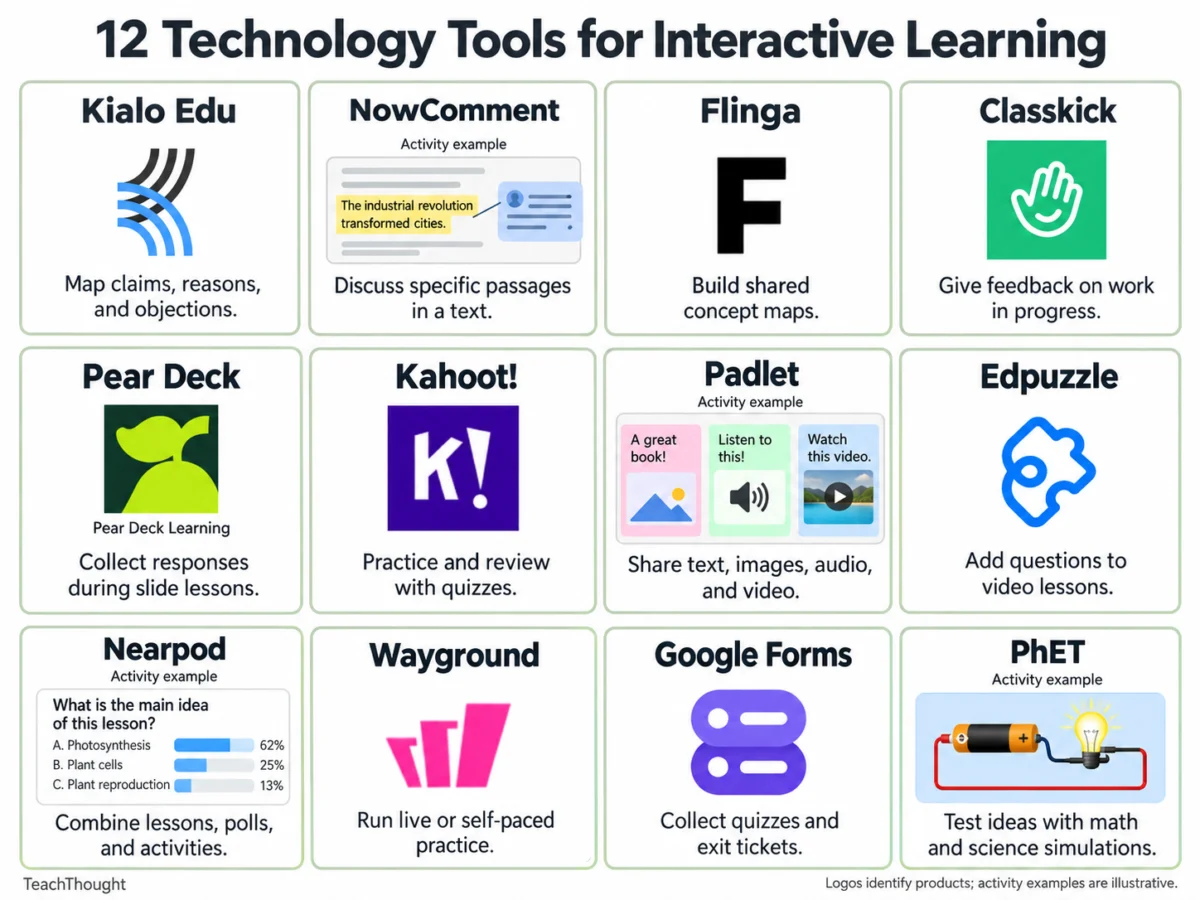
Interactive Learning Tools Transforming Modern Classroom Engagement
The rapid evolution of digital pedagogy has fundamentally reshaped how educators approach student engagement, formative assessment, and collaborative problem-solving across modern educational landscapes. Technology tools designed for interactive learning now provide students with structured pathways to articulate ideas, test complex hypotheses, evaluate competing claims, and receive immediate feedback. Simultaneously, educators leverage these platforms to aggregate whole-class responses, diagnose conceptual misunderstandings in real time, and dynamically adjust instructional pacing to address targeted learning gaps.
As contemporary educational models continue to embrace flexible learning environments—spanning traditional in-person classrooms, blended hybrid courses, and fully remote instruction—the demand for versatile digital scaffolding has never been greater. Whether facilitating a nuanced textual analysis through shared document annotations, mapping complex ideological arguments via interactive canvases, or visualizing abstract scientific principles through dynamic simulations, digital tools cater to a wide spectrum of cognitive tasks. To navigate this expansive digital ecosystem, educators must carefully evaluate software capabilities against specific pedagogical goals, ensuring that technological integration directly serves instructional objectives rather than overshadowing them.
The Pedagogical Imperative of Real-Time Interaction
The integration of interactive learning technologies is grounded in established cognitive science principles regarding active learning and formative assessment. Traditional instructional paradigms often relied on delayed feedback loops, wherein student comprehension could only be gauged following summative assessments such as quizzes or major examinations. By contrast, contemporary interactive platforms enable continuous formative evaluation, allowing teachers to intercept misconceptions at the moment of inception.
According to educational technology researchers, digital tools that promote collaborative construction of knowledge significantly enhance critical thinking outcomes. When students are required to externally represent their reasoning—whether through a concept map, an annotated excerpt, or a predictive scientific model—they engage in metacognitive reflection. Furthermore, whole-class aggregation tools democratize participation, ensuring that quieter students or those hesitant to speak aloud in physical settings still contribute to classroom discourse. Educational administrators and instructional designers increasingly emphasize that the successful deployment of these tools requires intentional alignment between the cognitive demand of the task and the interactive features of the chosen platform.
Structured Argumentation and Collaborative Ideation
Developing robust critical thinking and reasoning skills requires students to move beyond simple assertion toward evidence-based argumentation and structured inquiry. Several digital platforms specialize in organizing complex dialogues and collaborative brainstorming sessions.
Kialo Edu for Structured Disagreement and Argument Mapping
Kialo Edu provides a specialized digital environment designed to organize complex discussions around a central claim or controversial prompt. By forcing users to categorize contributions into supporting and opposing branches, the platform visually maps the logical architecture of an argument. This structural clarity helps students examine the precise relationship between evidence, reasoning, and overarching claims.
In a typical secondary humanities or social studies classroom, educators might present a polarizing prompt such as, "Schools should eliminate traditional homework." Students are tasked with contributing distinct reasons, substantiating those claims with empirical evidence, and proactively addressing anticipated counterarguments. Instructors frequently use this platform to teach revision strategies, challenging students to refine claims that are overly broad or poorly supported. Best practices suggest modeling the distinction between bare assertions, underlying reasons, and concrete evidence before launching the digital activity, while keeping initial prompt scopes narrow to prevent cognitive overload. Kialo Edu maintains a free tier optimized for educational institutions.
NowComment for Close Reading and Shared Annotation
For literacy instruction and close reading exercises, NowComment facilitates threaded discussions directly alongside specific passages within digital texts. By tethering student commentary directly to the source material, the platform encourages rigorous textual analysis, peer review, and the comparative evaluation of multiple literary interpretations.
Educators frequently deploy public-domain historical speeches or complex scientific essays within the platform, prompting students to isolate authorial claims, critique the validity of provided evidence, and respond to divergent peer interpretations. To maintain academic rigor, teachers typically introduce a standardized annotation routine, preventing the document from devolving into disconnected or superficial commentary. NowComment offers free foundational accounts, though administrators must review document privacy settings and student data compliance before large-scale deployment.
Flinga for Collaborative Concept Mapping
Flinga supports synchronous and asynchronous collaborative brainstorming through shared digital whiteboards and workspaces. Accessible via a simple session code or direct URL, the platform allows students to aggregate disparate ideas, categorize concepts, and visually map relationships among complex variables.
In environmental science curricula, for instance, small groups might utilize Flinga Whiteboard to chart the multifaceted relationships governing local watersheds, connecting variables such as land use practices, agricultural runoff, water quality indices, and native wildlife populations. Students are subsequently required to articulate the rationale behind specific connectors and identify hypotheses lacking sufficient empirical backing. Instructors emphasize the necessity of establishing clear semiotic agreements regarding what spatial proximity and directional arrows represent prior to initiating the task.
Formative Assessment and In-Lesson Diagnostics
Gathering actionable data during instructional delivery remains a cornerstone of effective teaching. Digital platforms that capture student work in real time enable immediate pedagogical interventions.
Classkick for Live Student Monitoring and Feedback
Classkick bridges the gap between independent practice and individualized instruction by allowing teachers to design digital assignments and monitor student progress stroke-by-stroke as work develops. Unlike traditional static worksheets where feedback occurs post-submission, Classkick provides continuous visibility into student problem-solving processes.
Mathematics and physics educators frequently utilize the platform for complex problem-solving tasks, requiring students to submit multiple representations of a proportional reasoning problem. Teachers can review active screens and insert targeted inquiries precisely at the juncture where a student’s logical trajectory falters. The free Basic tier accommodates standard classroom workflows within specified monthly page limits, necessitating careful assignment planning based on class size.
Pear Deck for Interactive Slide-Based Presentations
Pear Deck integrates seamlessly into existing slide-based instructional workflows, embedding interactive questioning modalities directly into conventional lectures. Students utilize personal devices to submit real-time responses—ranging from multiple-choice selections to draggable indicators and free-text explanations—transforming passive listening into active engagement.
During lectures addressing scientific methodology, an instructor might pause a presentation to ask students to isolate the variable that best validates a given hypothesis, subsequently reviewing aggregated responses via the teacher dashboard. This immediate data visualization informs whether the instructor should proceed or review foundational definitions of controlled experiments.
Nearpod for Multi-Modal Multimedia Lessons
Nearpod expands upon slide-based interactivity by consolidating diverse media formats and interactive modalities—including virtual reality field trips, collaborative boards, embedded quizzes, and open-ended reflections—into unified instructional sequences. Teachers retain the flexibility to lead synchronous, teacher-paced sessions or assign lessons asynchronously for independent student pacing.
History instructors frequently initiate lessons with interactive polling concerning pivotal historical decisions before introducing primary-source documentation, later prompting students to reassess their initial stances based on newly discovered evidence. Nearpod’s free Silver tier supports standard classroom engagement parameters, though institutional upgrades are often required for advanced storage and reporting features.
Gamified Review and Assessment Platforms
Gamification strategies, when implemented thoughtfully, can enhance student motivation and reduce anxiety associated with knowledge retrieval and formative evaluation.
Kahoot! for Game-Based Review and Diagnostic Discussion
Kahoot! utilizes game mechanics—including point systems, timed responses, and leaderboards—to facilitate lively review sessions and knowledge checks. While the competitive format energizes many learning environments, educators must intentionally design quiz content to promote deep conceptual understanding rather than mere speed.
Science and mathematics teachers frequently embed distractors reflecting common student misconceptions into quiz questions. Crucially, the pedagogical value is realized not during the rapid-fire quiz itself, but in the subsequent facilitated debrief, where instructors analyze why certain incorrect answers appeared plausible, thereby unpacking underlying cognitive hurdles. Free access tiers outline strict participant caps per session, requiring institutional awareness when deploying across large cohorts.
Wayground (Formerly Quizizz) for Flexible Practice
Wayground, formerly operating under the Quizizz moniker, offers robust quiz-based learning experiences configurable for live synchronous competition or asynchronous self-paced homework assignments. The platform automatically generates diagnostic analytics detailing class-wide and individual performance metrics.
Language arts educators frequently employ the platform for contextual vocabulary acquisition, asking students to identify word meanings derived from specific literary excerpts. Post-activity analytics allow teachers to target remediation toward frequently missed items, examining the specific contextual clues students overlooked.
Google Forms for Efficient Exit Tickets and Assessments
Google Forms remains a ubiquitous, highly reliable tool for administering exit tickets, short quizzes, and formative check-ins. Capable of automated grading for objective question types alongside qualitative collection for open-ended reflections, Forms integrates smoothly with broader institutional productivity suites.
A standard pedagogical application involves the deployment of a three-question exit ticket at the conclusion of a class period: asking students to solve a representative problem, articulate a specific step in their reasoning, and identify a lingering point of confusion. Educators review these submissions prior to designing subsequent instructional groupings.
Multimedia and Simulation-Based Inquiry
Engaging students with dynamic media and interactive simulations allows them to investigate phenomena that are otherwise difficult or impossible to observe directly in a traditional classroom setting.
Edpuzzle for Interactive Video Comprehension
Edpuzzle enables educators to transform static video content into active learning experiences by embedding pause points, open-ended questions, multiple-choice checks, and audio notes directly into the timeline. Students cannot bypass embedded queries, ensuring active engagement with instructional videos assigned for homework or flipped classroom models.
During earth science units on erosion, an instructor might pause a documentary demonstration prior to the experimental outcome, requiring students to predict the geological result before evaluating their hypotheses against the subsequent video evidence. Edpuzzle’s free Basic tier provides adequate storage for foundational activity integration.
Padlet for Curated Digital Collaboration Spaces
Padlet provides a versatile, highly customizable digital canvas where students and teachers post multimedia contributions—including text, hyperlinked resources, audio recordings, and video files. Commenting functionalities enable structured peer critique and collaborative curation.
Literature discussions frequently utilize Padlet boards as digital galleries where students pin textual excerpts supporting character interpretations, subsequently engaging in threaded critiques of peer submissions to evaluate competing analytical claims. Free accounts limit the number of active boards, encouraging thoughtful archiving or collaborative sharing.
PhET Interactive Simulations for Scientific Inquiry
Developed by the University of Colorado Boulder, PhET Interactive Simulations provides an extensive library of research-based, interactive mathematical and scientific models. Students manipulate core variables within simulated environments—such as circuit construction kits, molecular bonding models, or projectile motion calculators—and observe real-time quantitative consequences.
Physics instructors regularly task students with constructing virtual electrical circuits, formulating predictions regarding voltage drops, and empirically testing those hypotheses against simulation data. By providing structured inquiry sheets alongside the simulation, educators guide students from empirical observation to theoretical generalization.
Strategic Selection and Implementation Framework
Choosing the optimal interactive learning tool requires a systematic pedagogical audit. Instructors must resist the temptation of technological novelty, anchoring their software selection in specific learning objectives and the exact nature of the evaluative data required. A brief written reflection via Google Forms may suffice to diagnose a conceptual misunderstanding, whereas an exploratory physics concept necessitates the dynamic variable manipulation offered by PhET simulations.
Ultimately, successful digital integration begins with established curriculum rather than software capabilities. By identifying specific friction points within an existing lesson sequence, determining what actionable student evidence is necessary to assess mastery, and selecting a tool that streamlines that collection process, educators can leverage interactive technology to foster deeper cognitive engagement, rigorous critical thinking, and equitable participation across all learning environments.

