
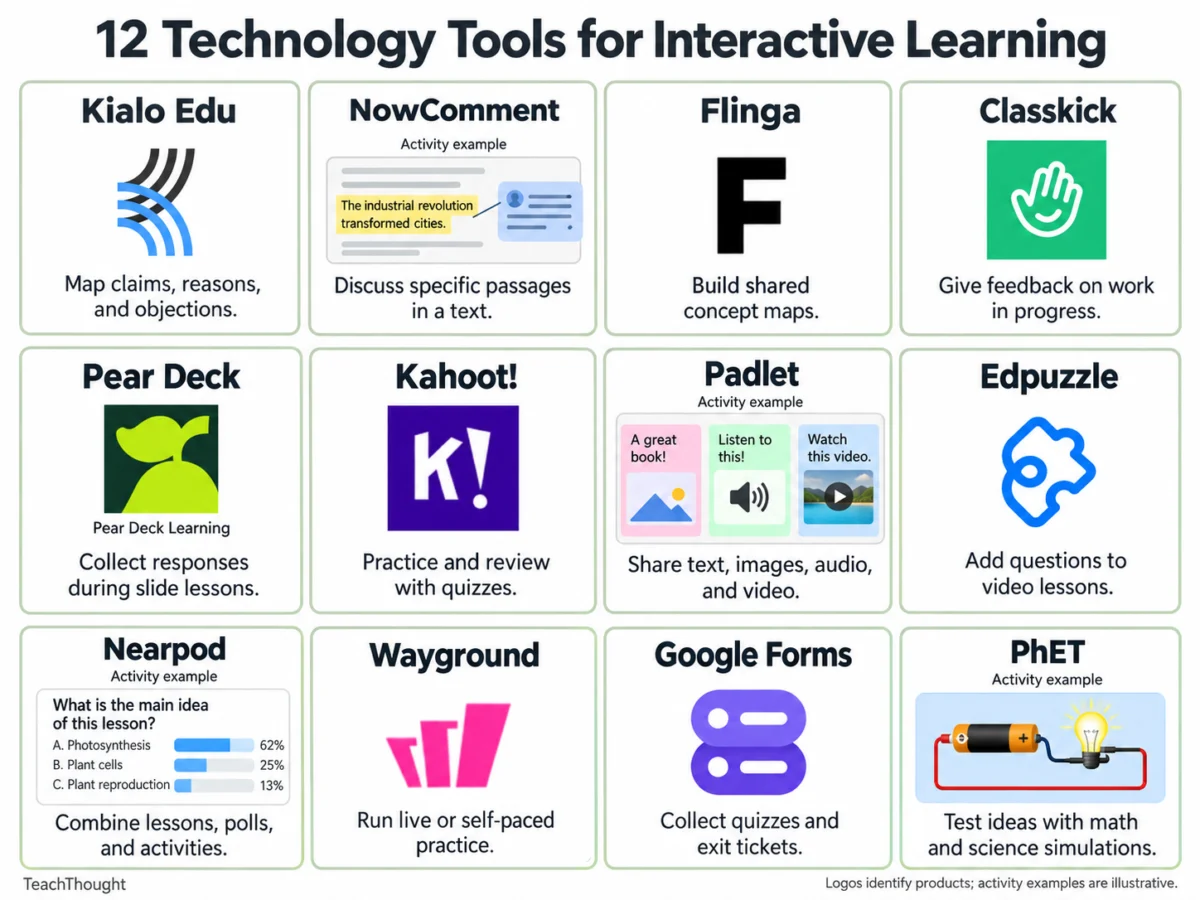
Technology tools for interactive learning have fundamentally reshaped modern pedagogical strategies, offering educators dynamic ways to engage students in collaborative discourse, critical reasoning, and real-time assessment. Whether deployed in traditional physical classrooms, hybrid environments, or fully remote settings, these digital platforms enable teachers to seamlessly gather whole-class feedback, track individual student progress, and dynamically adjust instruction to address identified learning gaps.
As educational institutions increasingly adopt blended learning models, the demand for versatile, reliable digital tools has surged. Recent educational technology market reports indicate that digital formative assessment and interactive instruction tools have seen widespread integration across K-12 and higher education sectors, driven largely by the shift toward student-centered learning methodologies. These twelve specialized tools cater to diverse pedagogical goals, ranging from collaborative close reading and concept mapping to gamified practice and interactive simulations.
The Evolution of Digital Interactivity in Education
The integration of interactive technology into school curricula did not happen overnight. Over the past two decades, educational technology has evolved from static content delivery systems—such as basic learning management systems and scanned textbook PDFs—into dynamic, collaborative environments where students actively construct knowledge.
- Early 2000s: Emergence of basic digital whiteboards and early online discussion forums, primarily used for asynchronous communication.
- 2010s: The rise of cloud-based collaborative documents, gamified quiz applications, and interactive presentation software, shifting classrooms from passive listening spaces to active participation hubs.
- 2020s: Accelerated by global shifts toward remote and hybrid learning, the market expanded to encompass specialized platforms for real-time annotation, complex argument mapping, and live formative feedback.
Educational researchers and instructional designers note that the primary value of these tools lies in their ability to make student thinking visible. By capturing real-time inputs from every student—rather than relying on the traditional model of calling on a single raised hand—teachers gain comprehensive data to drive instructional decisions.
Structured Arguments and Critical Thinking
1. Kialo Edu
- Useful for: Argument mapping and structured disagreement
- Overview: Kialo Edu is designed to organize complex discussions around a central claim, allowing students to systematically map supporting and opposing arguments. Users can reply directly to specific points within the map, visually tracing how individual reasons connect to broader claims.
- Classroom Application: Educators can prompt students to evaluate a contentious statement, such as the debate over homework policies in schools. Students contribute reasoned arguments, back them up with empirical evidence, and address counterarguments, culminating in the refinement of poorly supported claims.
- Implementation Note: Instructors should explicitly model the distinctions between assertions, reasons, and evidence before launching the activity. Due to the potential complexity of expansive maps, starting with narrow, focused questions ensures clarity.
2. NowComment
- Useful for: Close reading and shared annotation
- Overview: NowComment allows students to engage in threaded, contextual discussions directly alongside specific passages of online text. Because comments remain immutably anchored to the source material, the platform facilitates deep textual analysis, peer review, and the comparative interpretation of literature or historical speeches.
- Classroom Application: Teachers can share public-domain historical speeches or complex literary excerpts, instructing students to identify authorial claims, evaluate underlying evidence, and debate divergent interpretations with peers.
- Implementation Note: Establishing a structured annotation routine prevents documents from becoming overwhelmed by fragmented remarks. Checking institutional account requirements and document privacy settings is essential prior to assignment deployment.
Collaborative Concept Mapping and Workspace Sharing
3. Flinga
- Useful for: Collaborative concept mapping
- Overview: Flinga supplies shared digital workspaces where students can collectively harvest ideas, categorize concepts, and build visual relationship maps via a web browser using simple session codes or shared links. Flinga Whiteboard is particularly suited for mapping complex interdependencies.
- Classroom Application: Following a field study on local ecosystems, small student groups can map out causal chains linking land use, agricultural runoff, water quality, and local wildlife populations, subsequently presenting their rationale to the class.
- Implementation Note: Educators must clearly define the parameters and visual language of the map beforehand, as visually polished maps can sometimes conceal shallow conceptual reasoning.
4. Padlet
- Useful for: Sharing multimedia work and responding to peers
- Overview: Padlet functions as a flexible virtual bulletin board where students can publish text, images, video recordings, audio files, and external links. When comment features are enabled, it fosters asynchronous peer-to-peer critique and community discussion.
- Classroom Application: During literary analyses, students can post textual evidence supporting a character’s motivations, followed by structured peer responses evaluating alternative interpretations.
- Implementation Note: Setting clear behavioral and academic criteria for posts ensures meaningful engagement. Educators should review privacy controls, especially when students upload audio or visual media.
Real-Time Formative Assessment and Feedback
5. Classkick
- Useful for: Providing formative feedback while students work
- Overview: Classkick enables teachers to design digital assignments, monitor student workspaces as assignments develop, and deliver individualized feedback in real time. Because students can utilize digital ink, text, and multimedia, educators gain a holistic view of the problem-solving process rather than just the final answer.
- Classroom Application: Students working through multi-step proportional reasoning problems can submit work across multiple representations. Teachers can review progress mid-task and leave targeted guiding questions at the exact juncture where reasoning falters.
- Implementation Note: Educators should review platform tier limits—such as monthly student work page allowances—to ensure compatibility with class sizes and instructional frequency.
6. Pear Deck
- Useful for: Eliciting student responses during slide-based lessons
- Overview: Pear Deck integrates seamlessly into standard presentation software, injecting interactive question types directly into teacher-led slide decks. Students respond on individual devices, providing immediate diagnostic data to the instructor.
- Classroom Application: During an instructional unit on argumentative writing, teachers can embed prompts asking students to isolate the strongest piece of evidence supporting a claim, using aggregate responses to gauge conceptual clarity.
- Implementation Note: Reviewing feature distinctions between free and paid tiers ensures that planned activities align with available dashboard analytics.
7. Google Forms
- Useful for: Exit tickets and short-cycle assessments
- Overview: Google Forms provides a robust, highly accessible mechanism for administering short quizzes, collecting exit tickets, and delivering written feedback. While objective question types are graded automatically, open-ended reflections require qualitative review.
- Classroom Application: Deploying an end-of-class exit ticket requiring students to solve a single target problem, explain their foundational reasoning, and pinpoint remaining areas of confusion helps structure subsequent remediation groups.
- Implementation Note: Verifying link permissions prior to distribution ensures unimpeded student access across various institutional device policies.
Gamified Practice and Video Integration
8. Kahoot!
- Useful for: Quiz-based review and low-stakes competition
- Overview: Kahoot! empowers educators to build gamified review sessions incorporating time limits and competitive leaderboards, transforming traditional drill-and-practice routines into high-energy classroom events.
- Classroom Application: In science concept reviews, instructors can intentionally embed distractor answers reflecting common student misconceptions, pausing the game post-question to analyze why a false premise appears logical.
- Implementation Note: Educators should verify participant limits under current platform pricing tiers to accommodate whole-class instruction effectively.
9. Wayground (Formerly Quizizz)
- Useful for: Live and self-paced independent practice
- Overview: Formerly known as Quizizz, Wayground offers flexible quiz and activity structures deployable during live synchronized sessions or assigned as independent homework tasks, complete with optional gamification elements.
- Classroom Application: Vocabulary acquisition units can utilize self-paced modes where students determine word meanings within context passages, followed by targeted reviews of frequently missed items.
- Implementation Note: Session parameters should be adjusted to balance competitive features with individual learning paces depending on the affective needs of the student cohort.
10. Edpuzzle
- Useful for: Embedded questions and accountability within video lessons
- Overview: Edpuzzle allows instructors to curate video content from various sources, embedding formative checkpoints, reflective pauses, and open-ended queries directly into the timeline.
- Classroom Application: In earth science lessons demonstrating geological erosion, teachers can pause video playback mid-demonstration to compel student predictions regarding structural outcomes.
- Implementation Note: Careful selection of stopping points prevents cognitive overload and ensures video continuity is not overly fragmented by excessive interruptions.
11. Nearpod
- Useful for: Multi-activity multimedia lesson delivery
- Overview: Nearpod unifies diverse instructional media with polls, low-stakes quizzes, collaborative boards, and open-ended prompts into cohesive self-paced or teacher-paced learning modules.
- Classroom Application: Launching a social studies lesson with a predictive poll regarding a historical dilemma, followed by primary source analysis, allows students to re-evaluate initial assumptions based on new evidence.
- Implementation Note: Educators must monitor student participation caps associated with free or basic institutional subscription tiers.
Scientific Modeling and Simulation
12. PhET Interactive Simulations
- Useful for: Testing hypotheses in science and mathematics
- Overview: Developed by the University of Colorado Boulder, PhET provides a comprehensive repository of research-based interactive math and science simulations. Students manipulate visual variables—such as voltage, mass, or velocity—and observe immediate empirical consequences.
- Classroom Application: Using the Circuit Construction Kit, students assemble virtual circuits, formulate hypotheses regarding alterations in resistance, and empirically test their predictions through guided inquiry.
- Implementation Note: Providing structured observation protocols or inquiry worksheets ensures students maintain focus and properly document causal relationships rather than interacting with simulations aimlessly.
Implications and Strategic Selection
The proliferation of interactive learning technologies offers unprecedented opportunities to personalize instruction, foster collaborative critical thinking, and secure continuous formative feedback. However, educational technology experts emphasize that the mere adoption of digital tools does not guarantee improved learning outcomes.
Institutional analysis suggests that successful integration relies on a pedagogical-first approach: educators must clearly define their instructional objectives and identify the specific type of student evidence required before selecting a platform. By anchoring technology adoption in sound pedagogical design, schools can harness these digital tools to create more responsive, engaging, and equitable learning environments.

