
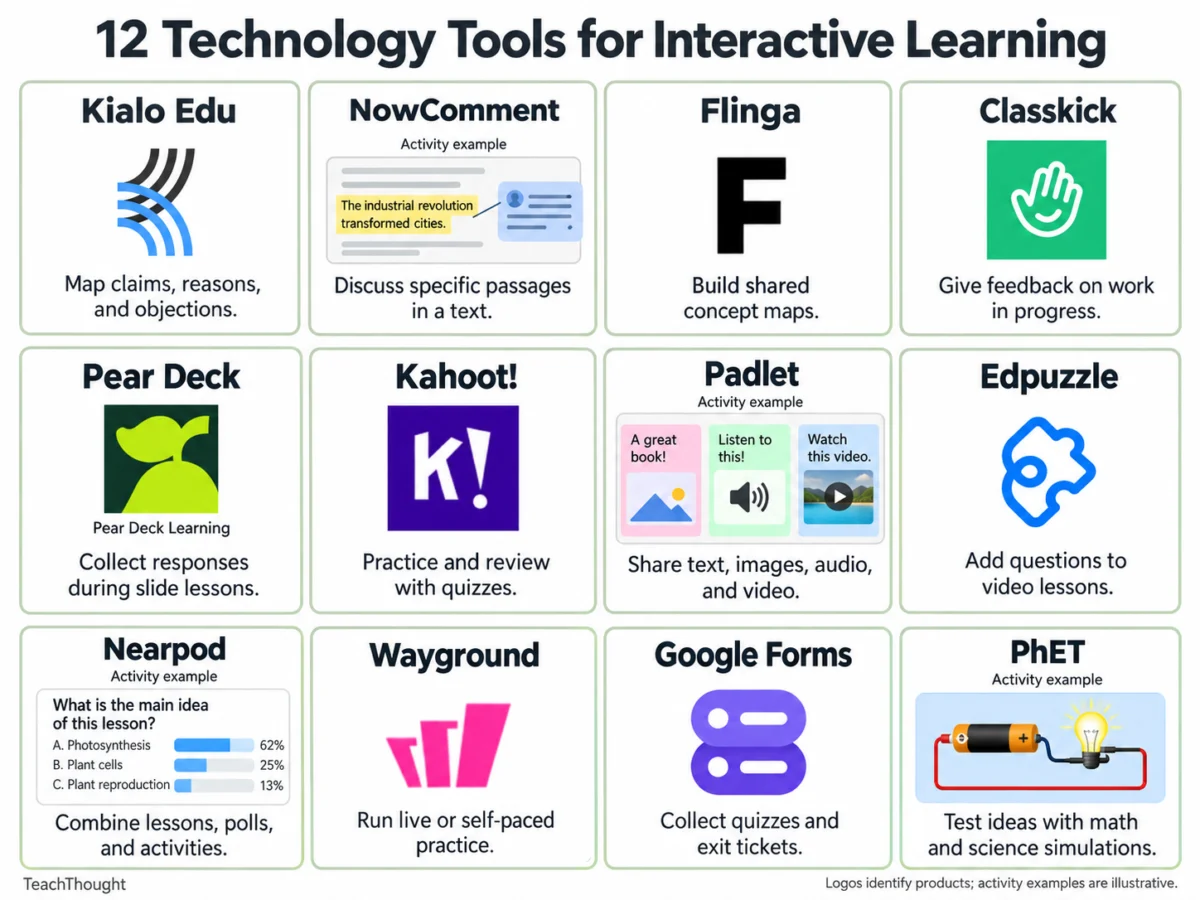
The integration of digital technology into contemporary education has fundamentally transformed how educators design instructional strategies, facilitate student engagement, and measure formative progress. Across in-person, hybrid, and remote learning environments, digital tools have evolved from supplementary novelties into core components of pedagogical delivery. Modern interactive learning platforms offer unprecedented capabilities for students to articulate ideas, test predictive hypotheses, dissect complex arguments, and receive immediate, targeted feedback. Simultaneously, these applications afford educators powerful mechanisms to aggregate whole-class responses, evaluate individual student trajectories in real-time, and dynamically adjust instructional pacing to address identified learning gaps.
The Evolution and Pedagogy of Interactive Classrooms
Over the past decade, educational technology has transitioned from static digitization—such as scanning physical textbooks into PDF formats—to highly dynamic, collaborative ecosystems. This shift is rooted in established educational theories, particularly social constructivism, which emphasizes that learning is an active, socially mediated process constructed through dialogue and shared inquiry. Digital tools operationalize this theory by removing physical barriers to collaboration. For instance, shared document annotations allow students to engage in deep textual analysis collectively, while digital concept maps make cognitive structures visible, enabling educators to pinpoint flawed reasoning before misconceptions become deeply entrenched.
Research consistently indicates that formative assessment—the continuous, formal and informal monitoring of student understanding during the learning process—is among the most powerful drivers of academic achievement. Interactive learning platforms streamline this data collection process. Instead of waiting for high-stakes summative examinations, teachers can leverage live polling, digital exit tickets, and continuous work-monitoring systems to evaluate mastery daily. This data-driven responsiveness allows for timely interventions, ensuring that advanced learners are sufficiently challenged while struggling students receive the scaffolding necessary for success.
Categorizing Digital Engagement: From Collaboration to Assessment
Selecting the appropriate digital tool requires alignment between specific pedagogical goals and technological capabilities. Educational technologists generally categorize these resources based on the type of participation they foster. Some applications prioritize collaborative text analysis and concept mapping, encouraging shared cognitive load among peers. Others focus on gamified practice and automated assessment, offering rapid feedback loops for procedural fluency. Furthermore, simulation platforms allow students to manipulate variables in simulated environments that mimic complex scientific and mathematical phenomena, bridging the gap between theoretical abstract concepts and empirical observation.
To assist educators and instructional designers in navigating this vast landscape, a detailed evaluation of twelve prominent interactive learning platforms follows. Each tool serves distinct instructional objectives, accompanied by practical implementation strategies and structural considerations for classroom deployment.
1. Kialo Edu: Structured Argumentation and Critical Thinking
Kialo Edu functions as a specialized platform designed to facilitate argument mapping and structured intellectual disagreement. By organizing discussions around a central, often controversial thesis, the platform requires students to populate visual maps with supporting and opposing claims. Users must evaluate specific points of contention within the hierarchy, explicitly demonstrating how particular reasons and pieces of evidence anchor a broader assertion.
In a practical classroom setting, educators might present students with a complex policy statement, such as the economic or social implications of standardized testing policies. Students are tasked with formulating a primary thesis, supporting it with verifiable empirical data, and proactively addressing anticipated counterarguments. This process trains students to recognize logical fallacies, distinguish between unsubstantiated assertions and credible evidence, and iteratively refine overly broad claims.
Pedagogical implementation requires careful scaffolding. Educators should explicitly model the structural distinctions between claims, reasons, and evidence prior to digital engagement. Because large argument maps can rapidly become labyrinthine and difficult for students to parse, instructors are advised to initiate sessions with tightly constrained, highly focused questions. Kialo Edu operates on a freemium model, providing robust free access via its dedicated education portal.
2. NowComment: Collaborative Annotation and Close Reading
NowComment transforms traditional reading assignments into interactive, social learning experiences by enabling threaded discussions directly alongside specific text passages within digital documents. Because comments remain persistently tethered to the source material, students can execute rigorous close readings, evaluate peer interpretations, and debate nuances line-by-line.
Classroom deployment frequently involves uploading public-domain historical speeches, foundational legal texts, or complex literary excerpts. Students are instructed to identify authorial claims, critically evaluate the validity of adjacent evidence, and respond to alternative interpretations posed by classmates. During subsequent synchronous discussions, teachers can surface contested passages directly from the document to anchor whole-class dialogue.
To maintain productivity, educators must establish clear annotation protocols to prevent digital margins from becoming cluttered with disconnected remarks. While NowComment offers comprehensive free accounts, administrators must carefully audit document privacy permissions and student account creation requirements to ensure compliance with institutional privacy policies prior to assignment rollout.
3. Flinga: Collaborative Concept Mapping and Spatial Ideation
Flinga provides shared, real-time digital workspaces designed for collective brainstorming, idea sorting, and dynamic concept mapping. Accessible via standard web browsers using session links or unique access codes, Flinga Whiteboard empowers students to synthesize disparate ideas visually, drawing explicit connections between complex variables.
A standard application in environmental science, for instance, involves small-group investigations of local watershed dynamics. Students map intricate relationships between agricultural land use, stormwater runoff, chemical pollution parameters, and local wildlife populations. Groups are subsequently required to articulate at least two causal links and highlight a specific relationship where empirical data remains inconclusive.
Successful deployment necessitates a shared classroom vocabulary regarding how spatial positions and connecting lines are interpreted. Instructors must note that a visually organized, aesthetically polished map can occasionally mask superficial or flawed reasoning. Educators should verify active session permissions and monitor current account limitations before designing multi-week curricular sequences.
4. Classkick: Real-Time Formative Feedback and Digital Workspaces
Classkick bridges the gap between independent practice and immediate pedagogical intervention by allowing teachers to design digital assignment slides, monitor student work streams in real time, and deliver targeted formative feedback while tasks are actively being completed. The platform supports multimodal inputs, including digital ink drawing, text entry, and embedded media.
For mathematics instruction, teachers might assign multi-step proportional reasoning tasks that require students to demonstrate solution pathways using dual representations, such as algebraic equations and proportional tables. As students work, the instructor observes the digital dashboard, interjecting targeted inquiry-based questions precisely at the cognitive bottleneck where a student’s methodological trajectory falters.
Institutional planners must account for platform scaling constraints. The free Basic tier historically imposes monthly caps on assignment slots and student work pages, where every individual slide manipulated by a student contributes to the aggregate quota. Reviewing these structural limits against total class sizes and assignment frequencies is essential for uninterrupted usage.
5. Pear Deck: Interactive Presentation Integration
Pear Deck integrates seamlessly with conventional slide-presentation software, embedding interactive question types directly into instructional slide decks. Students respond to prompts via individual student devices, supplying teachers with aggregate and individual metrics regarding comprehension levels before transitioning to subsequent instructional modules.
During a lecture on rhetorical analysis, an instructor might pause a slide deck to ask students to isolate the single piece of evidence that most effectively anchors an author’s primary argument, providing a written justification for their selection. The resulting data dashboard allows the teacher to immediately diagnose whether the cohort understands the nuanced distinction between relevant evidence and tangential background information.
This tool is particularly advantageous for educators heavily reliant on slide-based direct instruction. However, educators must evaluate plan comparison matrices prior to lesson design, as core interactive modalities and advanced teacher dashboard analytic features are frequently gated behind institutional paid subscriptions.
6. Kahoot!: Game-Based Review and Cognitive Diagnostic Assessments
Kahoot! leverages competitive game mechanics—including points, timed responses, and live leaderboards—to execute quiz-based knowledge checks and formative reviews. While the gamified environment generates high student engagement, educators must carefully calibrate competitive features to ensure they support, rather than detract from, inclusive learning objectives.
In high-school biology review sessions, instructors deliberately embed distractors representing common student misconceptions into multiple-choice options. Rather than simply recording high scores, the instructor pauses the game post-question to host a structured dialogue dissecting why a specific misconception appeared plausible and what structural errors rendered it incorrect. This diagnostic conversation yields significantly more instructional utility than the raw score alone.
Whole-class deployments require attention to concurrent participant thresholds. Free service tiers often impose strict caps on maximum player counts per active session, necessitating subscription upgrades or alternative grouping strategies for large-scale academic cohorts.
7. Padlet: Multimodal Knowledge Curation and Peer Review
Padlet establishes flexible, virtual corkboard environments where students can independently or collaboratively publish text notes, hyperlinked media, high-resolution imagery, audio recordings, and document files. When comment functionality is enabled, the platform facilitates asynchronous peer review and academic discourse.
Within humanities curricula, students frequently curate virtual boards displaying primary-source excerpts that substantiate their individual interpretations of a literary protagonist’s motivations. Peers are subsequently tasked with navigating adjacent boards, analyzing differing interpretations, and using textual citations to defend agreements or challenge alternative viewpoints.
Clear instructional prompts are vital to prevent open-ended curation tasks from devolving into unstructured posting sessions. Furthermore, instructors must review content moderation settings and student privacy permissions, particularly when assignments involve uploaded multimedia or student-generated audio-visual recordings. Free account tiers typically restrict users to a limited number of active boards simultaneously.
8. Edpuzzle: Embedded Video Assessment and Pacing Control
Edpuzzle empowers educators to curate digital video content from various sources, embedding formative assessment questions, audio notes, and open-ended reflection prompts at precise timestamps. This architecture transforms passive video consumption into an active, accountable learning exercise suitable for flipped classrooms or independent study.
For earth science units focusing on geological erosion, an instructor can curate a documentary clip, inserting a strategic predictive pause prior to the climax of a physical demonstration. Students must submit an explicit scientific prediction before the video resumes, subsequently evaluating whether empirical observations aligned with their initial hypothesis.
Careful curation of stopping points is critical; excessive interruptions can fragment complex explanations and disrupt cognitive processing. Edpuzzle’s free Basic plan generally imposes storage limitations on the total number of active instructional activities a single educator account can archive.
9. Nearpod: Comprehensive Multimedia Lesson Architecture
Nearpod functions as an all-in-one instructional delivery platform that unifies traditional slide content with integrated interactive activities, including collaborative boards, formative quizzes, virtual field trips, and open-ended inquiry prompts. Teachers can execute these lessons synchronously in real-time or assign them asynchronously for student-paced completion.
In social studies classrooms, units frequently launch with an interactive poll capturing student impressions regarding complex historical dilemmas. Instructors then introduce primary-source archival documents, prompting learners to assess whether the newly introduced evidence shifts their initial ethical calculations, thereby driving subsequent Socratic seminars.
Nearpod is exceptionally valuable when instructors wish to deploy a diverse array of interactive formats within a unified pedagogical flow. However, free plan iterations, such as the standard Silver tier, enforce stringent caps on concurrent student joins per session, alongside storage restrictions for media assets.
10. Wayground (Formerly Quizizz): Flexible Practice and Gamified Assessment
Wayground, previously recognized as Quizizz, provides robust infrastructure for both live, gamified classroom competitions and independent, self-paced student practice. The platform accommodates diverse item types and grants educators access to extensive public question banks, while offering granular reporting on individual and group performance trends.
During lexical acquisition phases, educators assign vocabulary challenges where students deduce contextual word meanings from embedded literary passages. Post-assessment analytics highlight chronically missed items, allowing instructors to host targeted interventions focusing explicitly on contextual clue identification strategies.
Educators should review session configurations carefully, as self-paced execution modes do not automatically eliminate competitive anxiety for all learners. The platform’s free entry-level tier provides baseline question types and reporting structures, though resource storage quotas and advanced administrative features vary regionally based on current corporate deployment models.
11. Google Forms: Streamlined Exit Tickets and Summative Checks
Google Forms serves as a dependable, highly accessible utility for gathering structured student feedback, administering brief quizzes, and executing formative exit tickets. The platform automatically grades objective items, while open-ended qualitative responses and explanatory fields require manual teacher review.
A standard exit-ticket implementation requires students to solve a singular mathematical problem, articulate the conceptual rationale governing a specific algorithmic step, and explicitly identify any lingering areas of confusion. Instructors review these diagnostic outputs prior to planning subsequent instructional cycles or grouping students for targeted remediation.
Prior to distribution, educators must verify form-sharing permissions to ensure students across varying institutional accounts can successfully access and submit responses. For broader methodological frameworks regarding diagnostic data collection, educational literature such as TeachThought’s compilation of formative assessment strategies offers extensive guidance.
12. PhET Interactive Simulations: Empirical Inquiry in STEM Disciplines
Developed by the University of Colorado Boulder, PhET Interactive Simulations provides a vast repository of research-based, interactive mathematical and scientific models. These simulations allow students to manipulate underlying variables in real time and observe the resulting dynamic phenomena without physical laboratory constraints.
Using circuit construction simulations, students build virtual electrical pathways, formulate hypotheses regarding the impact of altered resistance or voltage, and test their predictive models empirically. Students document anomalous behaviors and utilize direct visual observations to construct scientific explanations for system outputs.
Successful utilization requires structured investigative prompts and clear documentation protocols to guide student inquiry. Instructors must verify simulation compatibility across all classroom hardware configurations, paying close attention to accessibility needs for diverse learners.
Strategic Framework for Tool Selection
The proliferation of educational technology necessitates disciplined pedagogical curation rather than indiscriminate adoption. Instructional designers and classroom teachers are advised to initiate the selection process by identifying the specific learning objective and the precise nature of the cognitive diagnostic data required. If the primary instructional goal is uncovering a subtle misconception regarding algebraic manipulation, a real-time feedback workspace like Classkick is superior to a gamified quiz platform. Conversely, if students must investigate complex dynamic relationships governed by unseen variables, simulation software such as PhET provides unmatched empirical depth.
Educators should begin by anchoring digital integration around a single, familiar instructional unit currently taught via traditional means. By rigorously defining what student cognitive outputs would most effectively illuminate learning progress, instructors can purposefully select the singular digital tool that makes collecting and analyzing those responses seamless and impactful.

